
File Upload
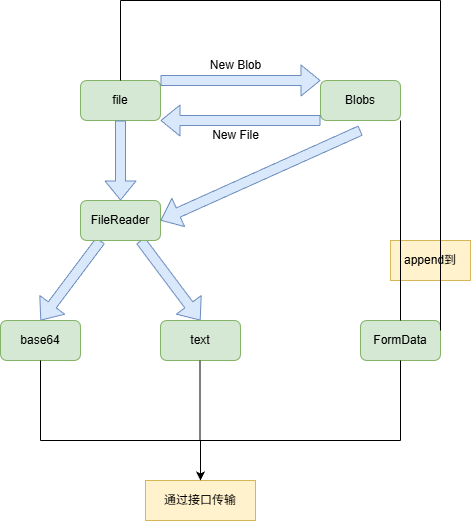
二进制 blob 传输
Section titled “二进制 blob 传输”- 使用 formData 传输
import { createFileRoute } from "@tanstack/react-router";import {  AlertCircle,  CheckCircle2,  ImageIcon,  Trash2,  UploadCloud,} from "lucide-react";import { useEffect, useMemo, useRef, useState } from "react";import { Button } from "#/components/ui/button";
export const Route = createFileRoute("/upload/")({  component: RouteComponent,});
const acceptedImageTypes = [  "image/jpeg",  "image/png",  "image/webp",  "image/gif",];const acceptedImageText = "JPG、PNG、WEBP、GIF";const maxFileSize = 5 * 1024 * 1024;
function formatFileSize(size: number) {  if (size < 1024 * 1024) {    return `${(size / 1024).toFixed(1)} KB`;  }
  return `${(size / 1024 / 1024).toFixed(2)} MB`;}
function RouteComponent() {  const [file, setFile] = useState<File | null>(null);  const [error, setError] = useState("");  const [isDragging, setIsDragging] = useState(false);  const inputRef = useRef<HTMLInputElement>(null);
  const previewUrl = useMemo(() => {    if (!file) {      return "";    }
    return URL.createObjectURL(file);  }, [file]);
  useEffect(() => {    return () => {      if (previewUrl) {        URL.revokeObjectURL(previewUrl);      }    };  }, [previewUrl]);
  const validateAndSetFile = (selectedFile?: File) => {    setError("");
    if (!selectedFile) {      setFile(null);      return false;    }
    if (!acceptedImageTypes.includes(selectedFile.type)) {      setError(`请上传 ${acceptedImageText} 格式的图片`);      setFile(null);      return false;    }
    if (selectedFile.size > maxFileSize) {      setError("图片大小不能超过 5MB");      setFile(null);      return false;    }
    setFile(selectedFile);    return true;  };
  const handleFileChange = (e: React.ChangeEvent<HTMLInputElement>) => {    const isValid = validateAndSetFile(e.target.files?.[0]);
    if (!isValid) {      e.target.value = "";    }  };
  const handleDrop = (e: React.DragEvent<HTMLLabelElement>) => {    e.preventDefault();    setIsDragging(false);    validateAndSetFile(e.dataTransfer.files?.[0]);  };
  const handleClear = () => {    setFile(null);    setError("");
    if (inputRef.current) {      inputRef.current.value = "";    }  };
  const handleSubmit = async () => {    if (!file) {      setError("请先选择需要上传的图片");      return;    }
    const formData = new FormData();    formData.append("image", file);
    try {      console.log("准备上传的文件:", formData.get("image"));      // 示例: const response = await fetch('/api/upload', { method: 'POST', body: formData });      // if (response.ok) alert('上传成功');    } catch (err) {      console.error("上传失败", err);      setError("上传失败,请重试");    }  };
  return (    <main className="min-h-dvh bg-muted/30 px-4 py-8 sm:px-6 lg:px-8">      <div className="mx-auto flex w-full max-w-3xl flex-col gap-5">        <header className="flex flex-col gap-2">          <p className="text-sm font-medium text-muted-foreground">图片上传</p>          <div className="flex flex-col gap-3 sm:flex-row sm:items-end sm:justify-between">            <div>              <h1 className="text-2xl font-semibold tracking-normal text-foreground">                上传素材图片              </h1>              <p className="mt-2 max-w-xl text-sm leading-6 text-muted-foreground">                支持常见图片格式,单张图片最大                5MB。选择文件后可先确认预览再上传。              </p>            </div>            <div className="flex w-fit items-center gap-2 rounded-lg border bg-background px-3 py-2 text-xs text-muted-foreground">              <CheckCircle2 className="size-4 text-emerald-600" />              本地校验已启用            </div>          </div>        </header>
        <section className="overflow-hidden rounded-xl border bg-background shadow-sm">          <div className="grid gap-0 lg:grid-cols-[1fr_280px]">            <div className="p-4 sm:p-6">              <label                className={[                  "flex min-h-70 cursor-pointer flex-col items-center justify-center gap-4 rounded-lg border border-dashed px-5 py-8 text-center transition-colors",                  isDragging                    ? "border-primary bg-primary/5"                    : "border-border bg-muted/30 hover:bg-muted/50",                  error ? "border-destructive/70 bg-destructive/5" : "",                ].join(" ")}                onDragEnter={() => setIsDragging(true)}                onDragLeave={() => setIsDragging(false)}                onDragOver={(e) => e.preventDefault()}                onDrop={handleDrop}              >                <input                  ref={inputRef}                  className="sr-only"                  type="file"                  name="image"                  accept="image/png, image/jpeg, image/webp, image/gif"                  onChange={handleFileChange}                />
                <span className="flex size-14 items-center justify-center rounded-lg border bg-background">                  <UploadCloud className="size-7 text-muted-foreground" />                </span>                <span className="space-y-1">                  <span className="block text-base font-medium text-foreground">                    拖拽图片到这里,或点击选择文件                  </span>                  <span className="block text-sm text-muted-foreground">                    {acceptedImageText},最大 5MB                  </span>                </span>              </label>            </div>
            <aside className="border-t bg-muted/20 p-4 sm:p-6 lg:border-l lg:border-t-0">              <div className="flex h-full min-h-55 flex-col gap-4">                <div className="flex items-center justify-between gap-3">                  <h2 className="text-sm font-medium text-foreground">                    文件详情                  </h2>                  {file ? (                    <Button                      aria-label="清除已选文件"                      onClick={handleClear}                      size="icon-sm"                      type="button"                      variant="ghost"                    >                      <Trash2 className="size-4" />                    </Button>                  ) : null}                </div>
                <div className="flex flex-1 flex-col gap-4">                  <div className="flex aspect-4/3 items-center justify-center overflow-hidden rounded-lg border bg-background">                    {previewUrl ? (                      <img                        alt={file?.name ?? "已选择图片"}                        className="h-full w-full object-contain"                        src={previewUrl}                      />                    ) : (                      <div className="flex flex-col items-center gap-2 text-muted-foreground">                        <ImageIcon className="size-8" />                        <span className="text-sm">等待选择图片</span>                      </div>                    )}                  </div>
                  {file ? (                    <dl className="grid gap-3 text-sm">                      <div>                        <dt className="text-muted-foreground">文件名</dt>                        <dd className="mt-1 break-all font-medium text-foreground">                          {file.name}                        </dd>                      </div>                      <div className="grid grid-cols-2 gap-3">                        <div>                          <dt className="text-muted-foreground">大小</dt>                          <dd className="mt-1 font-medium text-foreground">                            {formatFileSize(file.size)}                          </dd>                        </div>                        <div>                          <dt className="text-muted-foreground">类型</dt>                          <dd className="mt-1 font-medium text-foreground">                            {file.type.replace("image/", "").toUpperCase()}                          </dd>                        </div>                      </div>                    </dl>                  ) : (                    <p className="text-sm leading-6 text-muted-foreground">                      选择图片后,这里会显示预览、文件名、大小和格式。                    </p>                  )}                </div>              </div>            </aside>          </div>
          <div className="flex flex-col gap-3 border-t bg-background px-4 py-4 sm:flex-row sm:items-center sm:justify-between sm:px-6">            <div className="min-h-5">              {error ? (                <p className="flex items-center gap-2 text-sm text-destructive">                  <AlertCircle className="size-4" />                  {error}                </p>              ) : file ? (                <p className="flex items-center gap-2 text-sm text-emerald-700">                  <CheckCircle2 className="size-4" />                  文件已就绪,可以上传                </p>              ) : (                <p className="text-sm text-muted-foreground">                  请先选择一张需要上传的图片。                </p>              )}            </div>
<div className="flex gap-2"> <Button disabled={!file} onClick={handleSubmit} type="button" className="w-full sm:w-auto" > <UploadCloud className="size-4" /> 上传图片 </Button> </div> </div> </section> </div> </main> );}import { createFileRoute } from "@tanstack/react-router";import { AlertCircle, CheckCircle2, ImageIcon, Trash2, UploadCloud, X,} from "lucide-react";import { useEffect, useRef, useState } from "react";import { Button } from "#/components/ui/button";
export const Route = createFileRoute("/upload/")({ component: RouteComponent,});
const acceptedImageTypes = [ "image/jpeg", "image/png", "image/webp", "image/gif",];const acceptedImageText = "JPG、PNG、WEBP、GIF";const maxFileSize = 5 * 1024 * 1024;const maxFileCount = 9;
type UploadItem = { id: string; file: File; previewUrl: string;};
function formatFileSize(size: number) { if (size < 1024 * 1024) { return `${(size / 1024).toFixed(1)} KB`; }
return `${(size / 1024 / 1024).toFixed(2)} MB`;}
function createId() { if (typeof crypto !== "undefined" && "randomUUID" in crypto) { return crypto.randomUUID(); }
return `${Date.now()}-${Math.random().toString(36).slice(2)}`;}
function RouteComponent() { const [items, setItems] = useState<UploadItem[]>([]); const [error, setError] = useState(""); const [isDragging, setIsDragging] = useState(false); const inputRef = useRef<HTMLInputElement>(null); const itemsRef = useRef(items);
itemsRef.current = items;
useEffect(() => { return () => { for (const item of itemsRef.current) { URL.revokeObjectURL(item.previewUrl); } }; }, []);
const addFiles = (incoming: FileList | File[] | null | undefined) => { if (!incoming || incoming.length === 0) { return; }
const incomingList = Array.from(incoming); const errors: string[] = []; const accepted: UploadItem[] = [];
setItems((prev) => { const seen = new Set( prev.map((item) => `${item.file.name}_${item.file.size}`), ); let remaining = maxFileCount - prev.length;
for (const file of incomingList) { if (remaining <= 0) { errors.push(`最多只能上传 ${maxFileCount} 张图片`); break; }
if (!acceptedImageTypes.includes(file.type)) { errors.push(`${file.name}:格式不支持`); continue; }
if (file.size > maxFileSize) { errors.push(`${file.name}:超过 5MB`); continue; }
const key = `${file.name}_${file.size}`; if (seen.has(key)) { continue; }
seen.add(key); accepted.push({ id: createId(), file, previewUrl: URL.createObjectURL(file), }); remaining -= 1; }
setError(errors.length > 0 ? Array.from(new Set(errors)).join(";") : ""); return [...prev, ...accepted]; }); };
const handleFileChange = (e: React.ChangeEvent<HTMLInputElement>) => { addFiles(e.target.files); e.target.value = ""; };
const handleDrop = (e: React.DragEvent<HTMLLabelElement>) => { e.preventDefault(); setIsDragging(false); addFiles(e.dataTransfer.files); };
const removeItem = (id: string) => { setItems((prev) => { const target = prev.find((item) => item.id === id); if (target) { URL.revokeObjectURL(target.previewUrl); } return prev.filter((item) => item.id !== id); }); setError(""); };
const handleClearAll = () => { for (const item of items) { URL.revokeObjectURL(item.previewUrl); } setItems([]); setError("");
if (inputRef.current) { inputRef.current.value = ""; } };
const handleSubmit = async () => { if (items.length === 0) { setError("请先选择需要上传的图片"); return; }
const formData = new FormData(); for (const item of items) { formData.append("images", item.file, item.file.name); }
try { console.log("准备上传的文件:", formData.getAll("images")); // 示例: const response = await fetch('/api/upload', { method: 'POST', body: formData }); // if (response.ok) alert('上传成功'); } catch (err) { console.error("上传失败", err); setError("上传失败,请重试"); } };
const totalSize = items.reduce((sum, item) => sum + item.file.size, 0); const hasItems = items.length > 0;
return ( <main className="min-h-dvh bg-muted/30 px-4 py-8 sm:px-6 lg:px-8"> <div className="mx-auto flex w-full max-w-3xl flex-col gap-5"> <header className="flex flex-col gap-2"> <p className="text-sm font-medium text-muted-foreground">图片上传</p> <div className="flex flex-col gap-3 sm:flex-row sm:items-end sm:justify-between"> <div> <h1 className="text-2xl font-semibold tracking-normal text-foreground"> 上传素材图片 </h1> <p className="mt-2 max-w-xl text-sm leading-6 text-muted-foreground"> 支持常见图片格式,单张图片最大 5MB,一次最多上传 {maxFileCount}{" "} 张,可在列表中单独删除。 </p> </div> <div className="flex w-fit items-center gap-2 rounded-lg border bg-background px-3 py-2 text-xs text-muted-foreground"> <CheckCircle2 className="size-4 text-emerald-600" /> 本地校验已启用 </div> </div> </header>
<section className="overflow-hidden rounded-xl border bg-background shadow-sm"> <div className="grid gap-0 lg:grid-cols-[1fr_320px]"> <div className="p-4 sm:p-6"> <label className={[ "flex min-h-70 cursor-pointer flex-col items-center justify-center gap-4 rounded-lg border border-dashed px-5 py-8 text-center transition-colors", isDragging ? "border-primary bg-primary/5" : "border-border bg-muted/30 hover:bg-muted/50", error ? "border-destructive/70 bg-destructive/5" : "", ].join(" ")} onDragEnter={() => setIsDragging(true)} onDragLeave={() => setIsDragging(false)} onDragOver={(e) => e.preventDefault()} onDrop={handleDrop} > <input ref={inputRef} className="sr-only" type="file" name="images" multiple accept="image/png, image/jpeg, image/webp, image/gif" onChange={handleFileChange} />
<span className="flex size-14 items-center justify-center rounded-lg border bg-background"> <UploadCloud className="size-7 text-muted-foreground" /> </span> <span className="space-y-1"> <span className="block text-base font-medium text-foreground"> 拖拽图片到这里,或点击选择文件 </span> <span className="block text-sm text-muted-foreground"> 支持多选,{acceptedImageText},单张最大 5MB </span> </span> </label> </div>
<aside className="border-t bg-muted/20 p-4 sm:p-6 lg:border-l lg:border-t-0"> <div className="flex h-full min-h-55 flex-col gap-4"> <div className="flex items-center justify-between gap-3"> <h2 className="text-sm font-medium text-foreground"> 已选文件 {hasItems ? ( <span className="ml-2 text-xs font-normal text-muted-foreground"> {items.length} / {maxFileCount} ·{" "} {formatFileSize(totalSize)} </span> ) : null} </h2> {hasItems ? ( <Button aria-label="清除全部文件" onClick={handleClearAll} size="icon-sm" type="button" variant="ghost" > <Trash2 className="size-4" /> </Button> ) : null} </div>
{hasItems ? ( <ul className="flex max-h-96 flex-1 flex-col gap-2 overflow-y-auto pr-1"> {items.map((item) => ( <li key={item.id} className="group flex items-center gap-3 rounded-lg border bg-background p-2" > <div className="size-12 shrink-0 overflow-hidden rounded-md border bg-muted"> <img alt={item.file.name} className="h-full w-full object-cover" src={item.previewUrl} /> </div> <div className="min-w-0 flex-1"> <p className="truncate text-sm font-medium text-foreground"> {item.file.name} </p> <p className="mt-0.5 text-xs text-muted-foreground"> {formatFileSize(item.file.size)} ·{" "} {item.file.type.replace("image/", "").toUpperCase()} </p> </div> <Button aria-label={`移除 ${item.file.name}`} onClick={() => removeItem(item.id)} size="icon-sm" type="button" variant="ghost" > <X className="size-4" /> </Button> </li> ))} </ul> ) : ( <div className="flex flex-1 flex-col items-center justify-center gap-2 rounded-lg border border-dashed bg-background/50 py-10 text-muted-foreground"> <ImageIcon className="size-8" /> <span className="text-sm">等待选择图片</span> </div> )} </div> </aside> </div>
<div className="flex flex-col gap-3 border-t bg-background px-4 py-4 sm:flex-row sm:items-center sm:justify-between sm:px-6"> <div className="min-h-5"> {error ? ( <p className="flex items-center gap-2 text-sm text-destructive"> <AlertCircle className="size-4" /> {error} </p> ) : hasItems ? ( <p className="flex items-center gap-2 text-sm text-emerald-700"> <CheckCircle2 className="size-4" /> {items.length} 个文件已就绪,可以上传 </p> ) : ( <p className="text-sm text-muted-foreground"> 请先选择需要上传的图片,支持一次选择多张。 </p> )} </div>
<div className="flex gap-2"> <Button disabled={!hasItems} onClick={handleSubmit} type="button" className="w-full sm:w-auto" > <UploadCloud className="size-4" /> 上传 {hasItems ? `${items.length} 张` : "图片"} </Button> </div> </div> </section> </div> </main> );}import { createFileRoute } from "@tanstack/react-router";import { AlertCircle, CheckCircle2, File as FileIcon, ImageIcon, Pause, Play, Trash2, UploadCloud, X,} from "lucide-react";import { useEffect, useMemo, useRef, useState } from "react";import { Button } from "#/components/ui/button";
export const Route = createFileRoute("/upload/")({ component: RouteComponent,});
const maxFileSize = 10 * 1024 * 1024 * 1024;const chunkSize = 5 * 1024 * 1024;const maxConcurrency = 3;
type UploadState = "idle" | "uploading" | "paused" | "completed" | "error";
type Chunk = { index: number; start: number; end: number; uploaded: boolean; uploading: boolean;};
function formatFileSize(size: number) { if (size < 1024) { return `${size} B`; } if (size < 1024 * 1024) { return `${(size / 1024).toFixed(1)} KB`; } if (size < 1024 * 1024 * 1024) { return `${(size / 1024 / 1024).toFixed(2)} MB`; } return `${(size / 1024 / 1024 / 1024).toFixed(2)} GB`;}
async function uploadChunkRequest( _blob: Blob, _meta: { index: number; total: number; fileName: string }, signal: AbortSignal,) { // 真实实现示例: // const formData = new FormData(); // formData.append("chunk", _blob); // formData.append("index", String(_meta.index)); // formData.append("total", String(_meta.total)); // formData.append("fileName", _meta.fileName); // await fetch("/api/upload/chunk", { method: "POST", body: formData, signal });
return new Promise<void>((resolve, reject) => { if (signal.aborted) { reject(new DOMException("Aborted", "AbortError")); return; } const onAbort = () => { clearTimeout(timer); signal.removeEventListener("abort", onAbort); reject(new DOMException("Aborted", "AbortError")); }; const timer = setTimeout( () => { signal.removeEventListener("abort", onAbort); resolve(); }, 300 + Math.random() * 400, ); signal.addEventListener("abort", onAbort); });}
function RouteComponent() { const [file, setFile] = useState<File | null>(null); const [error, setError] = useState(""); const [isDragging, setIsDragging] = useState(false); const [uploadState, setUploadState] = useState<UploadState>("idle"); const [uploadedBytes, setUploadedBytes] = useState(0); const inputRef = useRef<HTMLInputElement>(null); const chunksRef = useRef<Chunk[]>([]); const abortRef = useRef<AbortController | null>(null); const pauseRef = useRef(false);
const isImage = file?.type.startsWith("image/") ?? false;
const previewUrl = useMemo(() => { if (!file || !isImage) { return ""; } return URL.createObjectURL(file); }, [file, isImage]);
useEffect(() => { return () => { if (previewUrl) { URL.revokeObjectURL(previewUrl); } }; }, [previewUrl]);
useEffect(() => { return () => { abortRef.current?.abort(); }; }, []);
const totalChunks = chunksRef.current.length; const uploadedChunkCount = chunksRef.current.filter((c) => c.uploaded).length; const progress = file && file.size > 0 ? Math.min(100, (uploadedBytes / file.size) * 100) : 0;
const resetUploadState = () => { chunksRef.current = []; abortRef.current = null; pauseRef.current = false; setUploadedBytes(0); setUploadState("idle"); };
const validateAndSetFile = (selectedFile?: File) => { setError("");
if (!selectedFile) { setFile(null); resetUploadState(); return false; }
if (selectedFile.size > maxFileSize) { setError(`文件大小不能超过 ${formatFileSize(maxFileSize)}`); setFile(null); resetUploadState(); return false; }
setFile(selectedFile); resetUploadState(); return true; };
const handleFileChange = (e: React.ChangeEvent<HTMLInputElement>) => { const isValid = validateAndSetFile(e.target.files?.[0]);
if (!isValid) { e.target.value = ""; } };
const handleDrop = (e: React.DragEvent<HTMLLabelElement>) => { e.preventDefault(); setIsDragging(false); validateAndSetFile(e.dataTransfer.files?.[0]); };
const handleClear = () => { abortRef.current?.abort(); setFile(null); setError(""); resetUploadState();
if (inputRef.current) { inputRef.current.value = ""; } };
const startUpload = async () => { if (!file) { setError("请先选择需要上传的文件"); return; }
if (chunksRef.current.length === 0) { const chunks: Chunk[] = []; let index = 0; for (let start = 0; start < file.size; start += chunkSize) { chunks.push({ index, start, end: Math.min(start + chunkSize, file.size), uploaded: false, uploading: false, }); index++; } chunksRef.current = chunks; setUploadedBytes(0); }
pauseRef.current = false; const controller = new AbortController(); abortRef.current = controller; setUploadState("uploading"); setError("");
const total = chunksRef.current.length;
const worker = async () => { while (!pauseRef.current && !controller.signal.aborted) { const target = chunksRef.current.find( (c) => !c.uploaded && !c.uploading, ); if (!target) { return; } target.uploading = true;
try { await uploadChunkRequest( file.slice(target.start, target.end), { index: target.index, total, fileName: file.name }, controller.signal, ); target.uploaded = true; target.uploading = false; setUploadedBytes((prev) => prev + (target.end - target.start)); } catch (err) { target.uploading = false; if ((err as Error).name === "AbortError") { return; } throw err; } } };
try { const workers = Array.from( { length: Math.min(maxConcurrency, total) }, worker, ); await Promise.all(workers);
if (controller.signal.aborted) { return; }
if (chunksRef.current.every((c) => c.uploaded)) { setUploadState("completed"); console.log("所有分片上传完成,文件:", file.name); // 真实实现:通知后端合并分片 // await fetch("/api/upload/complete", { method: "POST", body: ... }); } } catch (err) { console.error("上传失败", err); setUploadState("error"); setError("上传失败,请重试"); } };
const pauseUpload = () => { pauseRef.current = true; abortRef.current?.abort(); setUploadState("paused"); };
const cancelUpload = () => { abortRef.current?.abort(); pauseRef.current = false; chunksRef.current = []; setUploadedBytes(0); setUploadState("idle"); };
const isUploading = uploadState === "uploading"; const isPaused = uploadState === "paused"; const isCompleted = uploadState === "completed"; const isErrored = uploadState === "error"; const hasProgress = totalChunks > 0;
return ( <main className="min-h-dvh bg-muted/30 px-4 py-8 sm:px-6 lg:px-8"> <div className="mx-auto flex w-full max-w-3xl flex-col gap-5"> <header className="flex flex-col gap-2"> <p className="text-sm font-medium text-muted-foreground">文件上传</p> <div className="flex flex-col gap-3 sm:flex-row sm:items-end sm:justify-between"> <div> <h1 className="text-2xl font-semibold tracking-normal text-foreground"> 大文件分片上传 </h1> <p className="mt-2 max-w-xl text-sm leading-6 text-muted-foreground"> 支持任意类型文件,单文件最大 {formatFileSize(maxFileSize)} ,按 {formatFileSize(chunkSize)} 切片上传,{maxConcurrency}{" "} 并发,可暂停/继续/取消。 </p> </div> <div className="flex w-fit items-center gap-2 rounded-lg border bg-background px-3 py-2 text-xs text-muted-foreground"> <CheckCircle2 className="size-4 text-emerald-600" /> 本地校验已启用 </div> </div> </header>
<section className="overflow-hidden rounded-xl border bg-background shadow-sm"> <div className="grid gap-0 lg:grid-cols-[1fr_280px]"> <div className="p-4 sm:p-6"> <label className={[ "flex min-h-70 cursor-pointer flex-col items-center justify-center gap-4 rounded-lg border border-dashed px-5 py-8 text-center transition-colors", isDragging ? "border-primary bg-primary/5" : "border-border bg-muted/30 hover:bg-muted/50", error ? "border-destructive/70 bg-destructive/5" : "", isUploading ? "pointer-events-none opacity-60" : "", ].join(" ")} onDragEnter={() => setIsDragging(true)} onDragLeave={() => setIsDragging(false)} onDragOver={(e) => e.preventDefault()} onDrop={handleDrop} > <input ref={inputRef} className="sr-only" type="file" name="file" disabled={isUploading} onChange={handleFileChange} />
<span className="flex size-14 items-center justify-center rounded-lg border bg-background"> <UploadCloud className="size-7 text-muted-foreground" /> </span> <span className="space-y-1"> <span className="block text-base font-medium text-foreground"> 拖拽文件到这里,或点击选择文件 </span> <span className="block text-sm text-muted-foreground"> 单文件最大 {formatFileSize(maxFileSize)} </span> </span> </label>
{file && hasProgress ? ( <div className="mt-4 space-y-2"> <div className="flex items-center justify-between text-xs text-muted-foreground"> <span> {uploadedChunkCount} / {totalChunks} 分片 ·{" "} {formatFileSize(uploadedBytes)} /{" "} {formatFileSize(file.size)} </span> <span className="font-medium text-foreground"> {progress.toFixed(1)}% </span> </div> <div className="h-2 overflow-hidden rounded-full bg-muted"> <div className={[ "h-full transition-all", isErrored ? "bg-destructive" : isCompleted ? "bg-emerald-500" : "bg-primary", ].join(" ")} style={{ width: `${progress}%` }} /> </div> </div> ) : null} </div>
<aside className="border-t bg-muted/20 p-4 sm:p-6 lg:border-l lg:border-t-0"> <div className="flex h-full min-h-55 flex-col gap-4"> <div className="flex items-center justify-between gap-3"> <h2 className="text-sm font-medium text-foreground"> 文件详情 </h2> {file ? ( <Button aria-label="清除已选文件" onClick={handleClear} size="icon-sm" type="button" variant="ghost" > <Trash2 className="size-4" /> </Button> ) : null} </div>
<div className="flex flex-1 flex-col gap-4"> <div className="flex aspect-4/3 items-center justify-center overflow-hidden rounded-lg border bg-background"> {previewUrl ? ( <img alt={file?.name ?? "已选择文件"} className="h-full w-full object-contain" src={previewUrl} /> ) : file ? ( <div className="flex flex-col items-center gap-2 text-muted-foreground"> <FileIcon className="size-8" /> <span className="px-4 text-center text-xs break-all"> {file.name} </span> </div> ) : ( <div className="flex flex-col items-center gap-2 text-muted-foreground"> <ImageIcon className="size-8" /> <span className="text-sm">等待选择文件</span> </div> )} </div>
{file ? ( <dl className="grid gap-3 text-sm"> <div> <dt className="text-muted-foreground">文件名</dt> <dd className="mt-1 break-all font-medium text-foreground"> {file.name} </dd> </div> <div className="grid grid-cols-2 gap-3"> <div> <dt className="text-muted-foreground">大小</dt> <dd className="mt-1 font-medium text-foreground"> {formatFileSize(file.size)} </dd> </div> <div> <dt className="text-muted-foreground">类型</dt> <dd className="mt-1 truncate font-medium text-foreground"> {file.type || "未知"} </dd> </div> </div> </dl> ) : ( <p className="text-sm leading-6 text-muted-foreground"> 选择文件后,这里会显示预览、文件名、大小和格式。 </p> )} </div> </div> </aside> </div>
<div className="flex flex-col gap-3 border-t bg-background px-4 py-4 sm:flex-row sm:items-center sm:justify-between sm:px-6"> <div className="min-h-5"> {error ? ( <p className="flex items-center gap-2 text-sm text-destructive"> <AlertCircle className="size-4" /> {error} </p> ) : isCompleted ? ( <p className="flex items-center gap-2 text-sm text-emerald-700"> <CheckCircle2 className="size-4" /> 上传完成 </p> ) : isUploading ? ( <p className="flex items-center gap-2 text-sm text-primary"> <UploadCloud className="size-4" /> 上传中…{progress.toFixed(1)}% </p> ) : isPaused ? ( <p className="flex items-center gap-2 text-sm text-amber-600"> <Pause className="size-4" /> 已暂停,可继续上传 </p> ) : file ? ( <p className="flex items-center gap-2 text-sm text-emerald-700"> <CheckCircle2 className="size-4" /> 文件已就绪,可以上传 </p> ) : ( <p className="text-sm text-muted-foreground"> 请先选择需要上传的文件。 </p> )} </div>
<div className="flex flex-wrap gap-2"> {isUploading ? ( <Button onClick={pauseUpload} type="button" variant="outline" className="w-full sm:w-auto" > <Pause className="size-4" /> 暂停 </Button> ) : null}
{(isPaused || isErrored) && hasProgress ? ( <Button onClick={cancelUpload} type="button" variant="outline" className="w-full sm:w-auto" > <X className="size-4" /> 取消 </Button> ) : null}
{isUploading ? null : ( <Button disabled={!file || isCompleted} onClick={() => void startUpload()} type="button" className="w-full sm:w-auto" > {isPaused ? ( <> <Play className="size-4" /> 继续上传 </> ) : isErrored ? ( <> <UploadCloud className="size-4" /> 重试 </> ) : isCompleted ? ( <> <CheckCircle2 className="size-4" /> 已完成 </> ) : ( <> <UploadCloud className="size-4" /> 开始上传 </> )} </Button> )} </div> </div> </section> </div> </main> );}import { createFileRoute } from "@tanstack/react-router";import { AlertCircle, CheckCircle2, File as FileIcon, ImageIcon, Loader2, Pause, Play, RotateCcw, Trash2, UploadCloud, X,} from "lucide-react";import { useEffect, useMemo, useRef, useState } from "react";import { Button } from "#/components/ui/button";
export const Route = createFileRoute("/upload/")({ component: RouteComponent,});
const maxFileSize = 10 * 1024 * 1024 * 1024;const chunkSize = 5 * 1024 * 1024;const maxConcurrency = 3;const storagePrefix = "upload:resume:";
type UploadState = | "idle" | "preparing" | "uploading" | "paused" | "completed" | "error";
type Chunk = { index: number; start: number; end: number; uploaded: boolean; uploading: boolean;};
type StoredProgress = { fileName: string; fileSize: number; totalChunks: number; uploadedIndices: number[]; updatedAt: number;};
function formatFileSize(size: number) { if (size < 1024) { return `${size} B`; } if (size < 1024 * 1024) { return `${(size / 1024).toFixed(1)} KB`; } if (size < 1024 * 1024 * 1024) { return `${(size / 1024 / 1024).toFixed(2)} MB`; } return `${(size / 1024 / 1024 / 1024).toFixed(2)} GB`;}
function buildChunks(file: File): Chunk[] { const chunks: Chunk[] = []; let index = 0; for (let start = 0; start < file.size; start += chunkSize) { chunks.push({ index, start, end: Math.min(start + chunkSize, file.size), uploaded: false, uploading: false, }); index++; } return chunks;}
async function computeFingerprint(file: File): Promise<string> { const sampleSize = Math.min(chunkSize, file.size); const head = await file.slice(0, sampleSize).arrayBuffer(); const tail = file.size > sampleSize ? await file.slice(file.size - sampleSize).arrayBuffer() : new ArrayBuffer(0); const meta = new TextEncoder().encode( `${file.name}|${file.size}|${file.lastModified}`, ); const combined = new Uint8Array( meta.byteLength + head.byteLength + tail.byteLength, ); combined.set(meta, 0); combined.set(new Uint8Array(head), meta.byteLength); combined.set(new Uint8Array(tail), meta.byteLength + head.byteLength); const hash = await crypto.subtle.digest("SHA-256", combined); return Array.from(new Uint8Array(hash)) .map((b) => b.toString(16).padStart(2, "0")) .join("") .slice(0, 32);}
function loadProgress(fingerprint: string): StoredProgress | null { try { const raw = localStorage.getItem(storagePrefix + fingerprint); if (!raw) { return null; } const parsed = JSON.parse(raw) as StoredProgress; if ( !parsed || typeof parsed.fileSize !== "number" || !Array.isArray(parsed.uploadedIndices) ) { return null; } return parsed; } catch { return null; }}
function saveProgress(fingerprint: string, progress: StoredProgress) { try { localStorage.setItem(storagePrefix + fingerprint, JSON.stringify(progress)); } catch (err) { console.warn("持久化上传进度失败", err); }}
function clearProgress(fingerprint: string) { try { localStorage.removeItem(storagePrefix + fingerprint); } catch { /* noop */ }}
async function uploadChunkRequest( _blob: Blob, _meta: { index: number; total: number; fingerprint: string; fileName: string; }, signal: AbortSignal,) { // 真实实现: // const formData = new FormData(); // formData.append("chunk", _blob); // formData.append("index", String(_meta.index)); // formData.append("total", String(_meta.total)); // formData.append("fingerprint", _meta.fingerprint); // formData.append("fileName", _meta.fileName); // await fetch("/api/upload/chunk", { method: "POST", body: formData, signal });
return new Promise<void>((resolve, reject) => { if (signal.aborted) { reject(new DOMException("Aborted", "AbortError")); return; } const onAbort = () => { clearTimeout(timer); signal.removeEventListener("abort", onAbort); reject(new DOMException("Aborted", "AbortError")); }; const timer = setTimeout( () => { signal.removeEventListener("abort", onAbort); resolve(); }, 300 + Math.random() * 400, ); signal.addEventListener("abort", onAbort); });}
function RouteComponent() { const [file, setFile] = useState<File | null>(null); const [error, setError] = useState(""); const [isDragging, setIsDragging] = useState(false); const [uploadState, setUploadState] = useState<UploadState>("idle"); const [uploadedBytes, setUploadedBytes] = useState(0); const [fingerprint, setFingerprint] = useState(""); const [resumedCount, setResumedCount] = useState(0); const inputRef = useRef<HTMLInputElement>(null); const chunksRef = useRef<Chunk[]>([]); const abortRef = useRef<AbortController | null>(null); const pauseRef = useRef(false); const fingerprintRef = useRef("");
fingerprintRef.current = fingerprint;
const isImage = file?.type.startsWith("image/") ?? false;
const previewUrl = useMemo(() => { if (!file || !isImage) { return ""; } return URL.createObjectURL(file); }, [file, isImage]);
useEffect(() => { return () => { if (previewUrl) { URL.revokeObjectURL(previewUrl); } }; }, [previewUrl]);
useEffect(() => { return () => { abortRef.current?.abort(); }; }, []);
useEffect(() => { if (!file) { setFingerprint(""); setResumedCount(0); chunksRef.current = []; setUploadedBytes(0); return; }
let cancelled = false; setUploadState("preparing"); setError("");
computeFingerprint(file) .then((fp) => { if (cancelled) { return; } setFingerprint(fp);
const chunks = buildChunks(file); const stored = loadProgress(fp); if ( stored && stored.fileSize === file.size && stored.fileName === file.name && stored.totalChunks === chunks.length ) { const restored = new Set(stored.uploadedIndices); let restoredBytes = 0; for (const chunk of chunks) { if (restored.has(chunk.index)) { chunk.uploaded = true; restoredBytes += chunk.end - chunk.start; } } chunksRef.current = chunks; setUploadedBytes(restoredBytes); setResumedCount(restored.size); if (restored.size === chunks.length) { setUploadState("completed"); } else { setUploadState("paused"); } } else { chunksRef.current = chunks; setUploadedBytes(0); setResumedCount(0); setUploadState("idle"); } }) .catch((err) => { if (cancelled) { return; } console.error("计算文件指纹失败", err); setError("无法识别该文件,请重试"); setUploadState("error"); });
return () => { cancelled = true; }; }, [file]);
const totalChunks = chunksRef.current.length; const uploadedChunkCount = chunksRef.current.filter((c) => c.uploaded).length; const progress = file && file.size > 0 ? Math.min(100, (uploadedBytes / file.size) * 100) : 0;
const validateAndSetFile = (selectedFile?: File) => { abortRef.current?.abort(); pauseRef.current = false; setError("");
if (!selectedFile) { setFile(null); return false; }
if (selectedFile.size > maxFileSize) { setError(`文件大小不能超过 ${formatFileSize(maxFileSize)}`); setFile(null); return false; }
setFile(selectedFile); return true; };
const handleFileChange = (e: React.ChangeEvent<HTMLInputElement>) => { const isValid = validateAndSetFile(e.target.files?.[0]); if (!isValid) { e.target.value = ""; } };
const handleDrop = (e: React.DragEvent<HTMLLabelElement>) => { e.preventDefault(); setIsDragging(false); validateAndSetFile(e.dataTransfer.files?.[0]); };
const handleClear = () => { abortRef.current?.abort(); pauseRef.current = false; setFile(null); setError(""); if (inputRef.current) { inputRef.current.value = ""; } };
const persistCurrentProgress = () => { const fp = fingerprintRef.current; if (!fp || !file) { return; } const uploadedIndices = chunksRef.current .filter((c) => c.uploaded) .map((c) => c.index); saveProgress(fp, { fileName: file.name, fileSize: file.size, totalChunks: chunksRef.current.length, uploadedIndices, updatedAt: Date.now(), }); };
const startUpload = async () => { if (!file || !fingerprint) { setError("请先选择需要上传的文件"); return; }
if (chunksRef.current.length === 0) { chunksRef.current = buildChunks(file); }
pauseRef.current = false; const controller = new AbortController(); abortRef.current = controller; setUploadState("uploading"); setError("");
const total = chunksRef.current.length; const fp = fingerprint;
const worker = async () => { while (!pauseRef.current && !controller.signal.aborted) { const target = chunksRef.current.find( (c) => !c.uploaded && !c.uploading, ); if (!target) { return; } target.uploading = true;
try { await uploadChunkRequest( file.slice(target.start, target.end), { index: target.index, total, fingerprint: fp, fileName: file.name, }, controller.signal, ); target.uploaded = true; target.uploading = false; setUploadedBytes((prev) => prev + (target.end - target.start)); persistCurrentProgress(); } catch (err) { target.uploading = false; if ((err as Error).name === "AbortError") { return; } throw err; } } };
try { const workers = Array.from( { length: Math.min(maxConcurrency, total) }, worker, ); await Promise.all(workers);
if (controller.signal.aborted) { return; }
if (chunksRef.current.every((c) => c.uploaded)) { setUploadState("completed"); clearProgress(fp); console.log("所有分片上传完成,文件:", file.name, "指纹:", fp); // 真实实现:通知后端合并分片 // await fetch("/api/upload/complete", { method: "POST", body: JSON.stringify({ fingerprint: fp }) }); } } catch (err) { console.error("上传失败", err); setUploadState("error"); setError("上传失败,已保留进度可重试"); } };
const pauseUpload = () => { pauseRef.current = true; abortRef.current?.abort(); setUploadState("paused"); persistCurrentProgress(); };
const cancelUpload = () => { abortRef.current?.abort(); pauseRef.current = false; if (fingerprint) { clearProgress(fingerprint); } chunksRef.current = file ? buildChunks(file) : []; setUploadedBytes(0); setResumedCount(0); setUploadState(file ? "idle" : "idle"); };
const isPreparing = uploadState === "preparing"; const isUploading = uploadState === "uploading"; const isPaused = uploadState === "paused"; const isCompleted = uploadState === "completed"; const isErrored = uploadState === "error"; const hasProgress = totalChunks > 0 && uploadedChunkCount > 0; const canStart = !!file && !!fingerprint && !isUploading && !isPreparing && !isCompleted;
return ( <main className="min-h-dvh bg-muted/30 px-4 py-8 sm:px-6 lg:px-8"> <div className="mx-auto flex w-full max-w-3xl flex-col gap-5"> <header className="flex flex-col gap-2"> <p className="text-sm font-medium text-muted-foreground">文件上传</p> <div className="flex flex-col gap-3 sm:flex-row sm:items-end sm:justify-between"> <div> <h1 className="text-2xl font-semibold tracking-normal text-foreground"> 大文件分片 · 断点续传 </h1> <p className="mt-2 max-w-xl text-sm leading-6 text-muted-foreground"> 单文件最大 {formatFileSize(maxFileSize)},按{" "} {formatFileSize(chunkSize)} 切片,{maxConcurrency}{" "} 并发上传;进度持久化到本地,刷新或重选同一文件可自动续传。 </p> </div> <div className="flex w-fit items-center gap-2 rounded-lg border bg-background px-3 py-2 text-xs text-muted-foreground"> <CheckCircle2 className="size-4 text-emerald-600" /> 本地校验已启用 </div> </div> </header>
<section className="overflow-hidden rounded-xl border bg-background shadow-sm"> <div className="grid gap-0 lg:grid-cols-[1fr_280px]"> <div className="p-4 sm:p-6"> <label className={[ "flex min-h-70 cursor-pointer flex-col items-center justify-center gap-4 rounded-lg border border-dashed px-5 py-8 text-center transition-colors", isDragging ? "border-primary bg-primary/5" : "border-border bg-muted/30 hover:bg-muted/50", error ? "border-destructive/70 bg-destructive/5" : "", isUploading || isPreparing ? "pointer-events-none opacity-60" : "", ].join(" ")} onDragEnter={() => setIsDragging(true)} onDragLeave={() => setIsDragging(false)} onDragOver={(e) => e.preventDefault()} onDrop={handleDrop} > <input ref={inputRef} className="sr-only" type="file" name="file" disabled={isUploading || isPreparing} onChange={handleFileChange} />
<span className="flex size-14 items-center justify-center rounded-lg border bg-background"> <UploadCloud className="size-7 text-muted-foreground" /> </span> <span className="space-y-1"> <span className="block text-base font-medium text-foreground"> 拖拽文件到这里,或点击选择文件 </span> <span className="block text-sm text-muted-foreground"> 单文件最大 {formatFileSize(maxFileSize)} </span> </span> </label>
{file && totalChunks > 0 ? ( <div className="mt-4 space-y-2"> <div className="flex items-center justify-between text-xs text-muted-foreground"> <span> {uploadedChunkCount} / {totalChunks} 分片 ·{" "} {formatFileSize(uploadedBytes)} /{" "} {formatFileSize(file.size)} </span> <span className="font-medium text-foreground"> {progress.toFixed(1)}% </span> </div> <div className="h-2 overflow-hidden rounded-full bg-muted"> <div className={[ "h-full transition-all", isErrored ? "bg-destructive" : isCompleted ? "bg-emerald-500" : "bg-primary", ].join(" ")} style={{ width: `${progress}%` }} /> </div> {resumedCount > 0 && !isCompleted ? ( <p className="flex items-center gap-1.5 text-xs text-amber-600"> <RotateCcw className="size-3.5" /> 已从本地恢复 {resumedCount} 个分片 </p> ) : null} </div> ) : null} </div>
<aside className="border-t bg-muted/20 p-4 sm:p-6 lg:border-l lg:border-t-0"> <div className="flex h-full min-h-55 flex-col gap-4"> <div className="flex items-center justify-between gap-3"> <h2 className="text-sm font-medium text-foreground"> 文件详情 </h2> {file ? ( <Button aria-label="清除已选文件" onClick={handleClear} size="icon-sm" type="button" variant="ghost" > <Trash2 className="size-4" /> </Button> ) : null} </div>
<div className="flex flex-1 flex-col gap-4"> <div className="flex aspect-4/3 items-center justify-center overflow-hidden rounded-lg border bg-background"> {previewUrl ? ( <img alt={file?.name ?? "已选择文件"} className="h-full w-full object-contain" src={previewUrl} /> ) : file ? ( <div className="flex flex-col items-center gap-2 text-muted-foreground"> <FileIcon className="size-8" /> <span className="px-4 text-center text-xs break-all"> {file.name} </span> </div> ) : ( <div className="flex flex-col items-center gap-2 text-muted-foreground"> <ImageIcon className="size-8" /> <span className="text-sm">等待选择文件</span> </div> )} </div>
{file ? ( <dl className="grid gap-3 text-sm"> <div> <dt className="text-muted-foreground">文件名</dt> <dd className="mt-1 break-all font-medium text-foreground"> {file.name} </dd> </div> <div className="grid grid-cols-2 gap-3"> <div> <dt className="text-muted-foreground">大小</dt> <dd className="mt-1 font-medium text-foreground"> {formatFileSize(file.size)} </dd> </div> <div> <dt className="text-muted-foreground">类型</dt> <dd className="mt-1 truncate font-medium text-foreground"> {file.type || "未知"} </dd> </div> </div> <div> <dt className="text-muted-foreground">指纹</dt> <dd className="mt-1 truncate font-mono text-xs text-foreground"> {isPreparing ? ( <span className="inline-flex items-center gap-1 text-muted-foreground"> <Loader2 className="size-3 animate-spin" /> 计算中… </span> ) : ( fingerprint.slice(0, 16) || "—" )} </dd> </div> </dl> ) : ( <p className="text-sm leading-6 text-muted-foreground"> 选择文件后,这里会显示预览、文件名、大小和指纹。 </p> )} </div> </div> </aside> </div>
<div className="flex flex-col gap-3 border-t bg-background px-4 py-4 sm:flex-row sm:items-center sm:justify-between sm:px-6"> <div className="min-h-5"> {error ? ( <p className="flex items-center gap-2 text-sm text-destructive"> <AlertCircle className="size-4" /> {error} </p> ) : isCompleted ? ( <p className="flex items-center gap-2 text-sm text-emerald-700"> <CheckCircle2 className="size-4" /> 上传完成 </p> ) : isUploading ? ( <p className="flex items-center gap-2 text-sm text-primary"> <UploadCloud className="size-4" /> 上传中… {progress.toFixed(1)}% </p> ) : isPaused ? ( <p className="flex items-center gap-2 text-sm text-amber-600"> <Pause className="size-4" /> 已暂停,进度已保存到本地 </p> ) : isPreparing ? ( <p className="flex items-center gap-2 text-sm text-muted-foreground"> <Loader2 className="size-4 animate-spin" /> 正在计算文件指纹… </p> ) : file ? ( <p className="flex items-center gap-2 text-sm text-emerald-700"> <CheckCircle2 className="size-4" /> 文件已就绪,可以上传 </p> ) : ( <p className="text-sm text-muted-foreground"> 请先选择需要上传的文件。 </p> )} </div>
<div className="flex flex-wrap gap-2"> {isUploading ? ( <Button onClick={pauseUpload} type="button" variant="outline" className="w-full sm:w-auto" > <Pause className="size-4" /> 暂停 </Button> ) : null}
{(isPaused || isErrored) && hasProgress ? ( <Button onClick={cancelUpload} type="button" variant="outline" className="w-full sm:w-auto" > <X className="size-4" /> 清除进度 </Button> ) : null}
{isUploading ? null : ( <Button disabled={!canStart} onClick={() => void startUpload()} type="button" className="w-full sm:w-auto" > {isCompleted ? ( <> <CheckCircle2 className="size-4" /> 已完成 </> ) : isErrored ? ( <> <UploadCloud className="size-4" /> 重试 </> ) : isPaused ? ( <> <Play className="size-4" /> 继续上传 </> ) : ( <> <UploadCloud className="size-4" /> 开始上传 </> )} </Button> )} </div> </div> </section> </div> </main> );}base64 传输
Section titled “base64 传输”- 转为 base64 传输
使用data url预览图片
Section titled “使用data url预览图片”<!DOCTYPE html><html lang="en"><head> <meta charset="UTF-8"> <meta name="viewport" content="width=device-width, initial-scale=1.0"> <title>Document</title> <style> #preview { max-width: 80%; } </style></head><body> <input type="file"> <img src="" alt="" id="preview"></html>const input = document.querySelector("input");const preview = document.getElementById("preview");
input.addEventListener("change", (event) => { const file = event.target.files[0]; if (file) { const reader = new FileReader(); reader.onload = function (e) { preview.src = e.target.result; }; reader.readAsDataURL(file); }});